


Your days off fill up first
Groceries, laundry and personal appointments compete for the same available days.

PlanBetter
Couldn't load pickup availability
Organize personal commitments and chosen routines around your known work schedule with the Weekly Planner Spreadsheet and four focused PDF tools.
You need a workable view of your personal week, with room for the limits and changes that come with it.
Groceries, laundry and personal appointments compete for the same available days.
A scattered list makes it harder to decide what deserves attention now and what can wait.
Knowing your shifts does not automatically organize the personal commitments around them.
A change in availability can leave you unsure which commitments to keep, reduce or move.
Give commitments a place across the week rather than collecting everything on one day off.
Use the preparation worksheet to select what fits your actual availability and defer the rest deliberately.
Use the existing habit grid as a record of routines you choose for yourself.
Look at the daily and overall completion displays, then decide what still matters for the remaining week.
The existing Weekly Planner Spreadsheet is your ongoing planning and completion record. The PDFs help you prepare realistic decisions and review changes, without becoming a second daily task log.
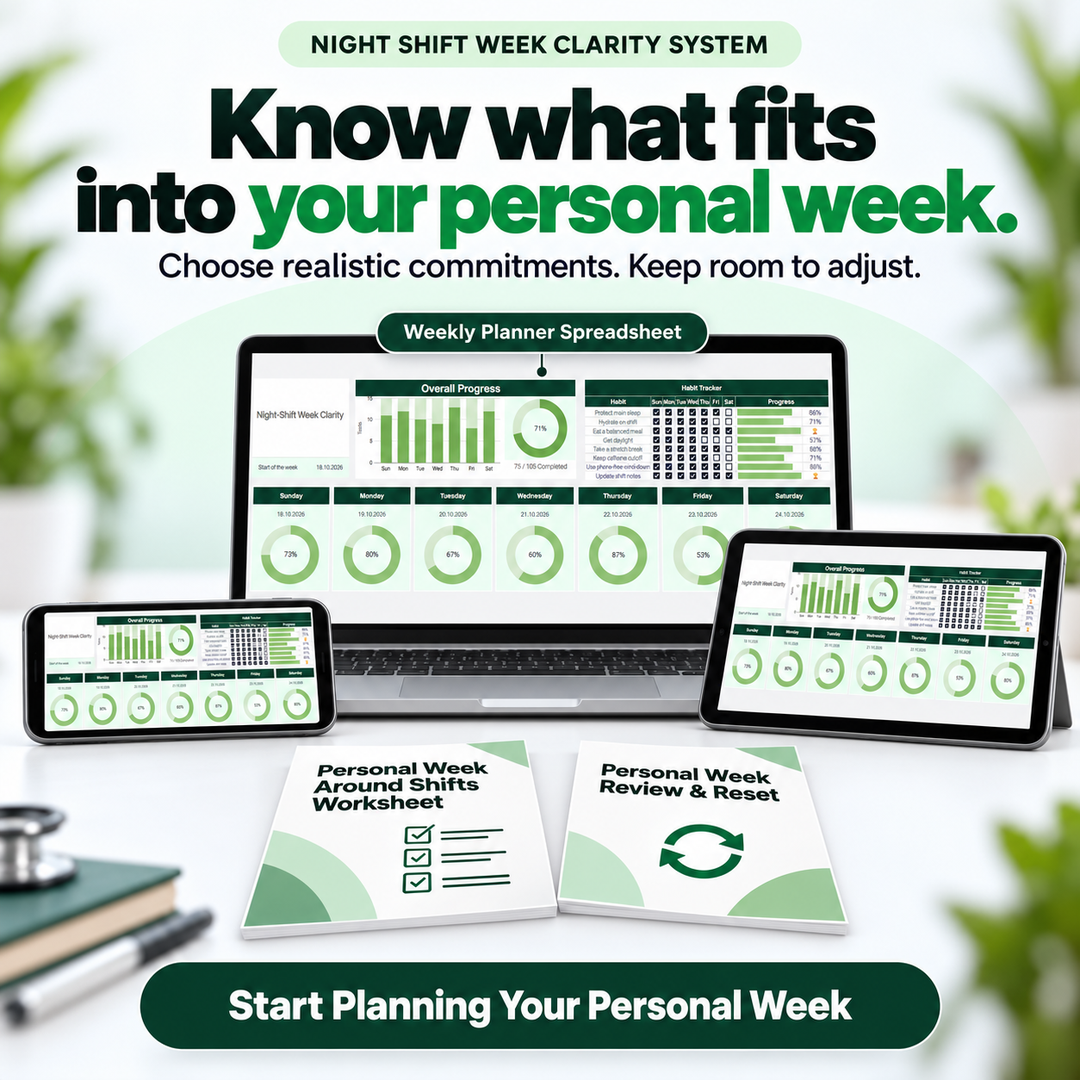
A visual Google Sheets planner for keeping your personal week and chosen routines visible. Refer to your official work schedule separately, then plan the commitments around it.

The real spreadsheet is shown with illustrative entries. Completion displays summarize entered checks; they are not health or recovery scores.

A known shift schedule can still leave personal commitments scattered. Start by noticing the commitments competing for the same time.

Check the days you actually have room, then choose a manageable personal action. Preparing the decision makes the weekly view more useful.

Keep your next action visible and revisit the remaining commitments when conditions change. The aim is a workable plan, with room to adjust.
Illustrative planning scenes, not customer accounts or promised results.
One existing Google Sheets planner plus four interactive supporting PDFs, totaling 46 pages.
Your central weekly view for personal planning, chosen routines and completion checks. Use it throughout the week after preparing your decisions.
10 pages to begin using the existing planner, prepare an initial week and understand its visible completion indicators.
12 pages covering opening, filling, saving, reopening and printing, with a practice form to check your own viewer workflow.
14 pages to check commitments and capacity, choose what fits, make explicit deferrals and prepare decisions for your planner.
10 pages to review an existing week, decide what continues or changes, and choose one practical return action.
Prepare with the worksheet, track in the spreadsheet, and use the review tool when the plan needs adjusting. The PDF usage guide supports the technical steps.
Keep your official work calendar. This system focuses on the personal commitments around it.
Preparation starts with existing commitments and available capacity instead of assuming every non-workday is empty.
The spreadsheet stays central. The supporting PDFs serve specific preparation, setup and review decisions.
Review the remaining week and update the same planner rather than automatically carrying every unfinished item forward.
Keep your shift calendar for work. The Weekly Planner focuses on the personal commitments and chosen routines around those known shifts. If your current tools already organize that comfortably, you may not need another system.
The Weekly Planner Spreadsheet, Weekly Planner Quick Start Guide, How to Use Your Interactive PDFs, Personal Week Around Shifts Worksheet, and Personal Week Review & Reset. The four supporting PDFs total 46 pages.
This is a digital product: a Google Sheets planner and interactive PDF support files. No physical item is shipped.
No. Use your existing official schedule as a reference. The system supports personal planning at the week and day level; it does not create a roster, calculate work hours or manage pay.
The supporting files contain fillable form fields and a printable fallback. The included usage guide explains Adobe Acrobat Reader on desktop and mobile. Viewer behavior varies: save a practice copy and reopen it to check that your answers remain visible. Check that the spreadsheet layout is comfortable on your own device.
Use Personal Week Review & Reset to decide what to continue, reduce, delay or drop. Confirm changes that need another person’s agreement, then update the planner manually. Automatic carryover, reminders and calendar synchronization are not included.
No. It supports personal planning and completion awareness. It does not provide medical advice, sleep treatment, patient records, clinical task management or employer scheduling.
Choose realistic commitments, keep your routines visible, and leave room to adjust.
Start Planning Your Personal WeekReturn to the product options above to choose this digital planning system.


Three simple steps to start making progress.
Get instant access.
Log what matters.
See your progress clearly.
Your goal isn't to build the perfect tracker. It's to get clearer, stay consistent, and move forward.