Skip to product information
1 of 6

PlanBetter

Client Task Tracker Spreadsheet – Organize Priorities & Deadlines

Client Task Tracker Spreadsheet – Organize Priorities & Deadlines

Regular price $19.00
Regular price Sale price $19.00
Sale Sold out
Taxes included.

A calmer command center for client work

See what matters next—without rebuilding your whole workflow

Bring client requests, priorities, due dates, and progress into one clear spreadsheet so you can start each day with direction and finish each week with fewer loose ends.

One view for every active task Clear priorities for today and this week Simple deadline visibility across clients

The real problem

Scattered work creates invisible pressure

When every client uses a different channel, the hardest part is not doing the work—it is deciding what deserves attention first.

Requests arrive everywhere

Email, messages, notes, and files become separate task lists that are difficult to trust.

Everything feels equally urgent

Without a single priority view, the loudest message can replace the most important next action.

Deadlines stay in your head

Mental tracking adds stress and makes it easier for approaching due dates to hide.

Progress is hard to scan

You spend valuable time checking what is done, overdue, blocked, or still waiting.

Complex tools become another project

You need useful structure, not a complicated platform that takes days to configure.

The shift

Turn task noise into a clear working rhythm

The Client Task Control System is designed to support the decisions you make every day and every week.

✓

Capture tasks in one reliable place

Move new client requests out of scattered channels and into one working list.

✓

Choose the next task with confidence

Use priority, due date, status, and category to see what needs attention.

✓

Spot deadline risk earlier

Keep due dates visible so urgent work is easier to identify before it becomes a crisis.

✓

Review the week in less chaos

Use a repeatable weekly check to reset priorities and close open loops.

✓

Keep the system simple enough to use

Work in a familiar Google Sheets format without adopting a full project management platform.

The core system

Your client workload, organized in one practical spreadsheet

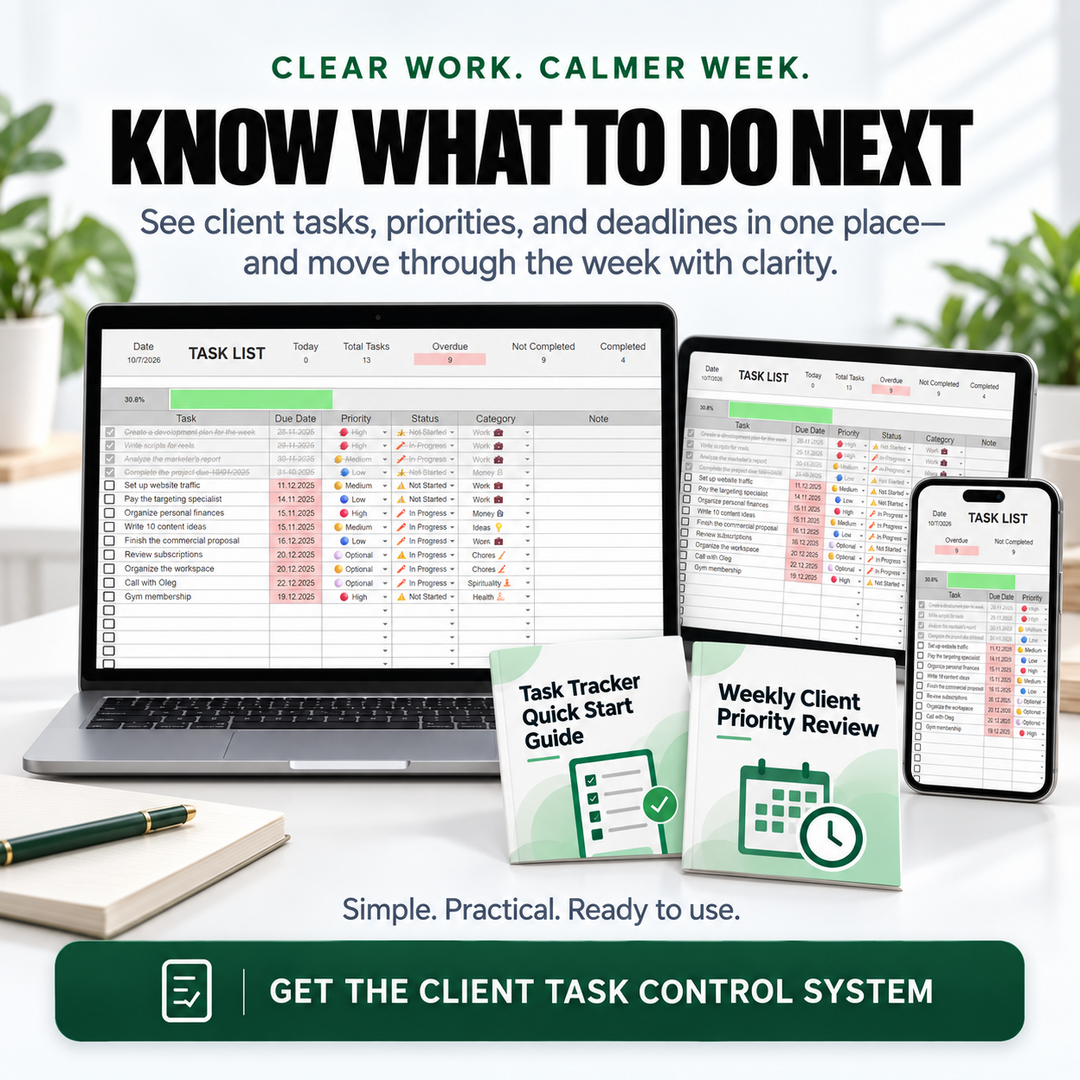
The Task Tracker Spreadsheet brings the details you need for day-to-day execution into one clear view—without burying you in setup.

  • Track the essentials: task, due date, priority, status, category, and notes.
  • Scan workload signals: today, total tasks, overdue, not completed, and completed.
  • See progress clearly: use the visible task summary and progress area to understand where work stands.
  • Adapt it to your clients: use the simple structure for different services, projects, and delivery rhythms.
Client Task Control System showing the Task Tracker Spreadsheet on laptop, tablet, and phone with supporting guides

From reactive to ready

A clearer way to move through client work

Step 1 · Capture

Scattered requests should not define your day

Gather tasks from messages, email, notes, and conversations before they disappear into the noise.

Freelancer feeling overwhelmed by scattered client tasks across notes, messages, and files

Step 2 · Decide

Make the next decision from one clear view

Compare priorities, dates, and status in one place so the next task is easier to choose.

Freelancer calmly reviewing organized priorities to choose the next client task

Step 3 · Review

End the week with fewer loose ends

Review what moved, what is late, and what needs a new priority before the next week begins.

Freelancer working with a clear weekly plan in an organized home office

Complete digital system

WHAT YOU WILL GET

Main product

Task Tracker Spreadsheet

The central Google Sheets workspace for organizing client tasks, due dates, priorities, status, categories, notes, and progress.

Task Tracker Quick Start Guide

A straightforward path from first open to a usable client task list.

How to Use Your Interactive PDFs

A short technical guide for opening, filling, saving, and reusing the included PDF tools.

Client Request Capture Workflow

A repeatable process for moving new requests into the tracker before they are forgotten.

Weekly Client Priority Review

A guided weekly check for deciding what matters next across active clients.

Deadline Rescue Plan

A practical response for overdue or at-risk work when priorities need to be reset quickly.

Built for real freelance work

Simple enough for today, structured enough for every client

1

Designed around multi-client reality

Keep different projects and competing deadlines visible in one working system.

2

Uses a familiar spreadsheet format

Start with a clear structure in Google Sheets instead of learning a complex app.

3

Supports daily and weekly decisions

Capture new work, choose what comes next, and run a consistent weekly reset.

4

No complicated project setup

Focus on the task information you actually need to deliver work reliably.

Frequently asked questions

Know exactly what you are getting

What is included?

You receive the Task Tracker Spreadsheet plus the Task Tracker Quick Start Guide, How to Use Your Interactive PDFs, Client Request Capture Workflow, Weekly Client Priority Review, and Deadline Rescue Plan.

Who is it for?

It is built for service freelancers—such as designers, marketers, writers, and virtual assistants—who manage multiple clients, projects, and deadlines.

Is this a general to-do list?

No. The system is specifically structured around client work, with fields for due dates, priorities, status, categories, notes, and workload progress.

Do I need advanced spreadsheet skills?

No advanced skills are required. The tracker uses a straightforward Google Sheets layout, and the Quick Start Guide helps you begin.

How do the supporting PDFs help?

They turn the spreadsheet into a repeatable workflow for capturing requests, reviewing priorities, handling deadline pressure, and using the interactive files correctly.

Does it replace a full project management platform?

It is intentionally simpler. It gives freelancers a focused way to organize tasks and deadlines without the setup and maintenance of a full platform.

Is there a monthly subscription?

No monthly subscription is part of this offer. The Client Task Control System is priced as a one-time purchase.

Give every client task a clear next step

Start with one dependable view for priorities, deadlines, and progress—then use the included workflows to keep it useful week after week.

Get the Client Task Control System

One-time purchase · Google Sheets tracker · Supporting digital guides


View full details
HOW IT WORKS

Simple. Trackable. Effective.

Three simple steps to start making progress.

01

Download

Get instant access.

02

Track

Log what matters.

03

Progress

See your progress clearly.

⚡ THE SMARTER WAY

Don't Build Another System. Start Making Progress.

Your goal isn't to build the perfect tracker. It's to get clearer, stay consistent, and move forward.

So which gets you there faster? 👇
WHAT MATTERS
🏆 SMARTER CHOICE
DIGITAL TRACKER
BUILDING IT YOURSELF
⏱️ YOUR TIME
Ready in minutes
Start instead of setting up.
Hours of setup
Formatting, formulas, testing...
🎯 YOUR FOCUS
One clear system
Everything has its place.
More things to manage
Tabs, tools and scattered data.
👀 YOUR CLARITY
See what matters
Your progress in one place.
Keep figuring it out
Build first. Understand later.
🔁 CONSISTENCY
Easy to come back to
Built for regular use.
Easy to abandon
Another unfinished system.
🚀 YOUR RESULT
Focus on progress
Work on your goal.
Focus on setup
Work on the spreadsheet.
⏱️ YOUR TIME
DIGITAL TRACKER ✓ Ready in minutes Start instead of setting up.
VS
BUILDING IT YOURSELF ✕ Hours of setup Formatting, formulas, testing...
🎯 YOUR FOCUS
DIGITAL TRACKER ✓ One clear system Everything has its place.
VS
BUILDING IT YOURSELF ✕ More things to manage Tabs, tools and scattered data.
👀 YOUR CLARITY
DIGITAL TRACKER ✓ See what matters Your progress in one place.
VS
BUILDING IT YOURSELF ✕ Keep figuring it out Build first. Understand later.
🔁 CONSISTENCY
DIGITAL TRACKER ✓ Easy to come back to Built for regular use.
VS
BUILDING IT YOURSELF ✕ Easy to abandon Another unfinished system.
🚀 YOUR RESULT
DIGITAL TRACKER ✓ Focus on progress Work on your goal.
VS
BUILDING IT YOURSELF ✕ Focus on setup Work on the spreadsheet.